
AI video prompts are easier to write when you treat them like clear English, not magic commands. The model needs the same things a reader needs: a subject, an action, a setting, and enough detail to understand the mood. If the sentence is vague to a person, it is usually vague to a generator too.
When using a Seedance 2.5 AI, plain English often beats technical language. A short, concrete prompt can produce a better clip than a long paragraph full of trendy words like cinematic, hyper-realistic, viral, and stunning with no real scene underneath.
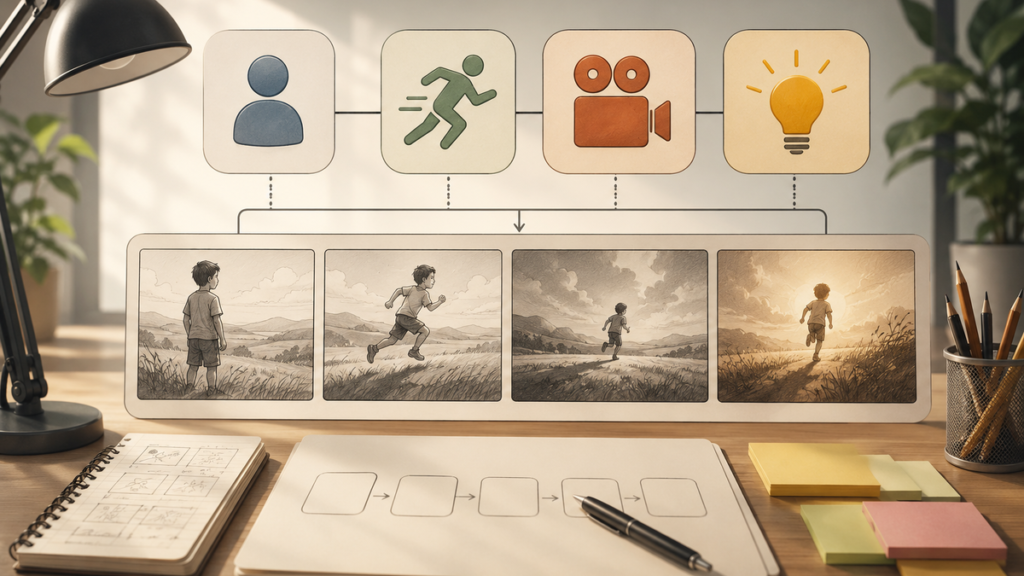
Prompt-writing illustration: a plain English sentence becomes a structured video prompt.
Start with the subject
A prompt should name the main subject first. Do not begin with style words. Begin with the thing the viewer should see: a coffee cup on a desk, a product box on a table, a dog running through grass, a student opening a notebook, or a city street at night. Clear nouns create a stable scene.
After the subject, add the action. The action should be small enough to happen in a short clip: steam rising, camera pushing in, person turning a page, product rotating slightly, light moving across a wall, or waves touching the shore. Strong verbs make the video easier to control.
Add camera language only when it helps
Camera words can improve prompts, but they should not become decoration. A pan moves across a scene. A dolly push-in moves closer. A zoom changes the lens view. An orbit moves around the subject. A locked-off shot keeps the camera still. Pick one camera move before combining several.
For beginners, one move is enough. “Slow dolly push-in on a coffee cup beside an open notebook” is clearer than “dynamic cinematic camera movement with professional production style.” The first prompt tells the model what to do. The second only asks it to guess.
Use text-to-video for complete scenes
If you are writing a scene from scratch, a Seedance 2.5 text-to-video prompt works best when the prompt is organized like a sentence. Try this structure: subject + action + setting + camera + style + format. For example: “A small candle flickers beside an open book on a rainy window ledge, slow push-in, warm cozy lighting, vertical short video.”
You can revise that sentence the same way you revise normal writing. Replace vague adjectives with concrete details. Cut repeated words. Move the important subject closer to the beginning.

Checklist visual: subject, action, camera, style, format, and review before generation.
Avoid vague prompt language
Words like beautiful, amazing, cool, viral, professional, and aesthetic do not tell the model what to show. They can be useful as tone, but they should not carry the whole prompt. Instead of “beautiful travel video,” write “wide shot of a quiet mountain road at sunrise, mist over pine trees, slow forward camera movement.”
The same rule applies to negative prompts and limitations. If something must stay stable, say it clearly: keep the same face, keep the same product shape, no text, no logo, no extra people, no changing background. Plain restrictions are better than emotional frustration after a bad result.
Write one prompt, then make one revision
Beginners often rewrite everything after a weak result. A better method is to change only one variable at a time. If the motion is too wild, keep the subject and setting but change the camera move. If the scene is too dark, keep the action and change the lighting. If the subject changes shape, add a stability instruction.
This turns prompting into editing. You are not guessing from scratch. You are improving a sentence until the output matches the idea.
A simple formula
Use this formula when stuck: “A [subject] [action] in/on/at [setting], [camera move], [lighting or style], [format].” It is not the only way to prompt, but it prevents most beginner mistakes.
Examples: a glass of lemonade with condensation on a picnic table, slow push-in, bright summer light, vertical short video. A product box opening on a clean desk, gentle top-down camera move, soft studio lighting, square social clip. A retro game controller on a desk, slight camera pan, moody blue lighting, horizontal intro clip.
A simple example workflow
Take the weak prompt, ‘make a cool product video.’ In plain English, rewrite it as: ‘A small glass bottle on a white desk, label facing forward, slow camera push-in, soft studio light, square social video.’ The second version has a subject, setting, action, camera move, lighting, and format. It gives the generator fewer reasons to guess.
If the result is close but not right, revise one part. Change ‘slow camera push-in’ to ‘locked-off shot’ if the movement is unstable. Change ‘soft studio light’ to ‘warm morning light’ if the mood is wrong. This is the same skill as editing a sentence: adjust the exact word that is causing confusion.
For an English-learning or writing site, AI prompting is a practical writing exercise. Readers can see how clearer nouns, verbs, and modifiers change the result. That makes the article useful even for people who are not video professionals: it teaches sentence precision through a modern creative task.
The practical takeaway
Good AI video prompts are good sentences. Name the subject, choose one action, describe the setting, add one camera move, and revise with care. Plain English gives the model a clearer job, and it gives you a better way to fix the prompt when the first result is not right.
For extra practice, writers can compare their sentence against the Seedance 2.5 prompt guide and revise one vague word at a time.
