
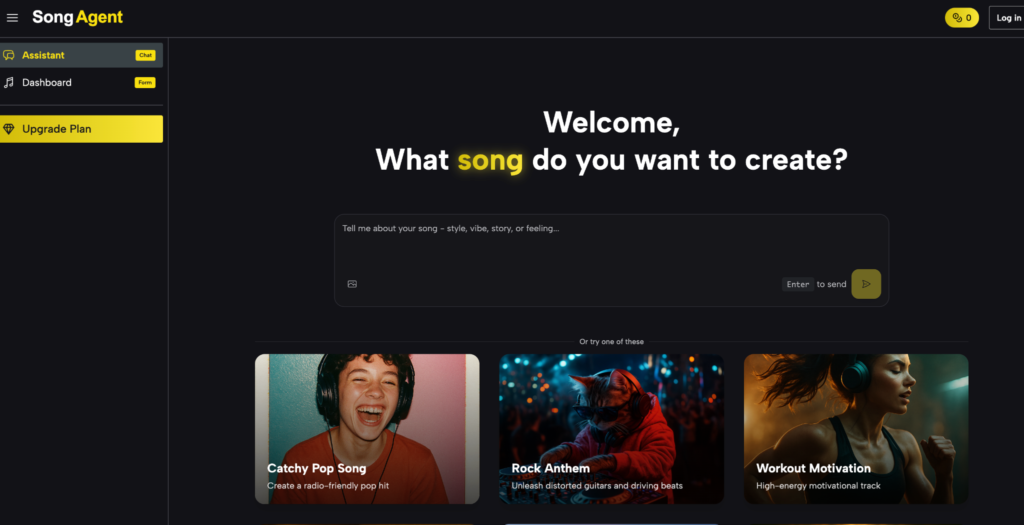
Most people who want original music hit the same wall: hiring composers is expensive, learning a DAW takes months, and stock music libraries feel impersonal. SongAgent approaches this differently — instead of a form or a plugin, it gives you a conversational AI Music Agent that understands genre, mood, and music theory, then composes original, royalty-free tracks to match. Whether you need a single background track or an entire album, SongAgent handles the full production pipeline without any musical expertise required.
Who SongAgent Is Built For
SongAgent fits a wide range of users who share one core problem: they need original, professional-quality music but don’t have the budget, skills, or time for traditional production.
- Content creators and YouTubers who are tired of searching stock libraries for music that never quite fits the mood of their videos
- Podcast producers who need consistent sonic branding — intros, outros, transitions, and segment music — that sounds cohesive across episodes
- Indie game developers who require adaptive, loopable soundtracks for multiple environments without the cost of a dedicated composer
- Marketing teams and brands building audio identity through jingles, ad tracks, and promotional music at scale
- Educators looking to make lessons more engaging with custom, genre-specific educational songs
- Independent musicians and songwriters who want to prototype ideas quickly, explore new styles, or overcome writer’s block with AI-assisted composition
The common thread: they need music that sounds human-composed, can be used commercially, and can be produced in minutes rather than weeks.
Core Features of SongAgent
Two Creation Modes: Simple and Custom
The AI Music Agent offers two distinct workflows depending on your experience level and how much control you want.
- Simple Mode is designed for speed — describe your idea in keywords or a sentence, choose from genre and mood tags, and the AI handles everything else. It’s the fastest path from idea to finished track, requiring no musical knowledge whatsoever.
- Custom Mode gives experienced users full control over title, lyrics (up to 3,000 characters), style descriptors, genre, mood, voice type, and tempo. This is the mode for songwriters who want to provide actual lyrics and have them set to music, or for producers who need precise stylistic specifications.
Both modes generate tracks in 1–3 minutes, output MP3 by default, and support WAV export on paid plans.
AI Lyrics Generator
For users who know the genre and mood they want but don’t have lyrics ready, the built-in AI Lyrics Generator produces full song lyrics from a theme, concept, or keyword set. It aligns lyrical content to the emotional tone and structure of the track, making it useful for overcoming writer’s block or rapidly generating lyric variations for review.
Vocal Remover and Stem Separation
SongAgent includes a Vocal Remover that separates vocals from any uploaded audio file, producing a clean instrumental track or an isolated vocal layer. Paid plan users can go further with stem separation of up to 10 individual stems — useful for remixing, karaoke production, and extracting specific instrument layers for reuse in other projects.
Extend Song
The Extend Song feature takes an existing generated track and intelligently expands it to a longer duration while preserving the original’s character, key, tempo, and arrangement style. This is particularly valuable for ambient, meditation, and background music use cases where 2–3 minute tracks need to become 10–20 minute loops.
MP3 to WAV Converter
A built-in format conversion tool upgrades MP3 files to lossless WAV for professional delivery workflows — useful when a client or platform requires uncompressed audio without using third-party conversion software.
Conversational AI Agent (Chat Mode)
The homepage chat interface is SongAgent’s most distinctive feature. Rather than filling out a form, you describe your musical project in natural language — including multi-track projects like albums, game soundtracks, or podcast packages. The AI:
- Decomposes your brief into a clear task plan before generating anything
- Runs batch compositions in parallel, producing multiple tracks simultaneously rather than one at a time
- Maintains stylistic consistency across an entire album or song series
- Accepts follow-up refinements conversationally — “make the chorus more energetic” or “add strings in the bridge” — without starting over
This is what separates SongAgent from form-based generators: it functions as a creative collaborator, not just a music rendering engine.
How to Create a Song with SongAgent
- Open songagent.com — no login required to start; free credits activate on sign-in
- Choose a mode — Simple for quick generation from keywords, Custom for lyrics-first or precise style control
- Fill in your details — add a title, style tags, genre, mood, voice type, and tempo (Custom), or just describe your concept (Simple)
- Click Generate — the AI composes and renders your track in 1–3 minutes
- Preview and refine — adjust settings or switch modes and regenerate if needed
- Export — download as MP3 (all plans) or WAV (paid plans), or continue into stem separation
For multi-track projects, use the Chat mode on the homepage: describe the full project scope and the AI will plan and batch-generate all tracks.
How SongAgent Compares
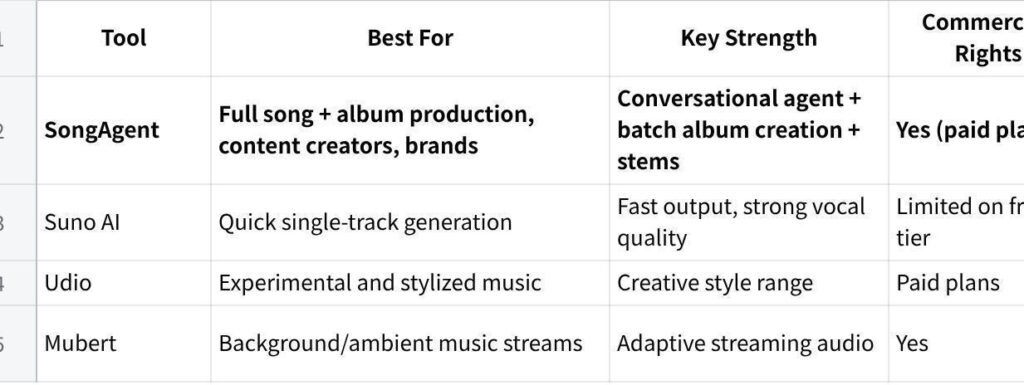
点击图片可查看完整电子表格
SongAgent’s clearest advantage is the batch album creation via the chat agent and stem separation — features that move it beyond single-track generators into a genuine production tool.
Conclusion
Original music no longer requires a studio budget or years of training. SongAgent’s combination of a conversational AI agent, multi-track batch composition, and a complete production toolkit — lyrics generation, vocal removal, stem separation, format conversion, and track extension — makes it one of the most complete AI music platforms currently available.
If you need music that sounds like it was made for your project specifically, rather than picked from a library, SongAgent is worth starting with. The free tier at songagent.com takes less than a minute to access, and your first track will be ready before you finish reading the next article.
