
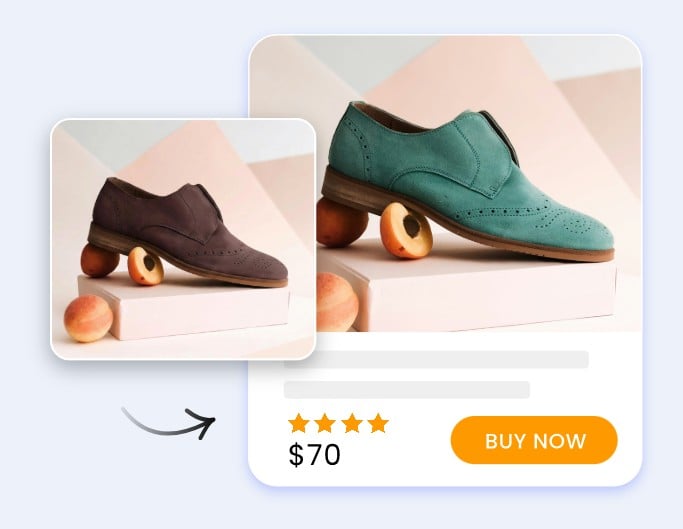
For most of the last decade, the answer to “how do we get product photos” was a photographer, a studio, and a day on the calendar. For small ecommerce brands in 2026, that math stopped working. Photoshoot day was the single most expensive recurring task in the product launch cycle, and the output (40 or so usable shots) rarely covered every SKU variation, every campaign, every channel.
The shift happened quietly. Brand owners did not announce they were leaving the photographer. They just started shooting once and using AI tools to multiply the output. By mid-2026, a Shopify brand with five hundred SKUs can run a full color refresh without a second shoot.
This article walks through five AI tools that are doing the actual replacing. None of them remove the need for a real camera at the start. They remove the need for the tenth retake, the third reshoot, and the rented studio.
The full-shoot economics that broke for small brands in 2026
A single product photoshoot for a small brand averages between $400 and $2,000 once you add the photographer, the studio rental, the model (if needed), the makeup, and the editing pass. The output is anywhere from twenty to sixty usable hero shots.
If you sell a sweater in eight colors, those numbers fall apart. You either shoot one color and let your product page look thin, or you shoot all eight and pay eight times. Furniture brands have it worse: a chair in fourteen finishes used to mean fourteen days of staging.
What changed is not that AI replaced photography. It is that AI made the second, third, and tenth photoshoot unnecessary. You shoot once, well, and the rest of the catalog gets built from that one shoot using a handful of specialized tools.
The five tools below are the ones I see brands actually using. They are not interchangeable. Each one solves a specific bottleneck in the catalog workflow.
Tool #1: AI Product Recolor
Recoloring is the highest-impact tool in the stack because color variants are the most common reason brands re-shoot. The AI takes a single product photo and applies a new color to the product while keeping the fabric texture, the lighting, the shadows, and the surrounding context intact.
This product recolor tool gives you a 14-color preset palette plus custom HEX input, which matters because brand teams usually have a Pantone or a specific HEX they need to match. You type the product name (sweater, chair, handbag) to help the AI lock onto the right object when the photo includes other items, pick the color, and get a recolored photo back in under a minute. Output is watermark-free and ready for product pages, ads, and listings.
Best use cases: apparel in multiple colorways, furniture finishes, accessory variants, packaging design tests. Less ideal for products where the color and the texture are tightly fused (some metallic finishes, certain natural materials).
Tool #2: AI Background Changer
Recoloring handles the product. The background is the second-biggest reason brands re-shoot. A campaign needs a beach context, a holiday version needs winter, a partner promotion needs a branded backdrop. None of those require a new product photo.
The AI background changer is a two-step tool. It removes the existing background automatically, then composites the subject onto a new background of your choice (color, custom image, or AI-generated scene). At 2 credits per change, it is the cheapest tool in the stack to run repeatedly, which matters for seasonal campaigns where you might cycle through five or six contexts.
A practical limit: the lighting in the original photo has to roughly match the new background. Dropping a product shot from a soft studio setup onto a harsh outdoor scene reads as composited even after the swap. For brands that anticipate frequent background swaps, the original photoshoot setup should err toward neutral lighting that travels well.
Tool #3: AI Outfit Generator
For apparel brands, the question is rarely “what color is this sweater” and more “what does the model look like wearing the full styled look.” Standard recolor and try-on tools require you to specify the new garment. The outfit generator is different: you upload one photo of a person and the AI redesigns the entire outfit, picking the clothing, the cut, the textures, and the styling combinations on its own.
An AI outfit generator for apparel is the right call when you need styled lookbook variations from a single model shoot. The face, pose, body proportions, and background all stay locked. Only the clothes change. Practical example: a one-day photoshoot with one model produces forty styled outfit variations instead of forty separate shoots.
The trade-off: because the AI makes the outfit choices automatically, you have less control over exactly what shows up than you would with a virtual try-on tool where you specify the garment. For brands that want a defined look, this is a fast first-pass tool that you then refine. For brands that want creative variety quickly, it is the whole workflow.
Tool #4: AI Image Combiner
Lifestyle compositions used to require a real lifestyle shoot: model, location, props, full setup. The image combiner solves a narrower version of that problem. You upload two to fourteen separate photos and the AI merges them at the content level into a single coherent image, not a side-by-side collage.
Output takes ten to twenty seconds. The tool runs on Nano Banana Pro, which handles the compositing well enough that the result reads as one photo rather than a cut-and-paste. Practical applications: putting a product into a model shot you already have, combining a product flat with a styled scene, creating campaign hero images from individual elements.
This is not a fix for bad source photos. If the lighting, color temperature, or perspective in the source images is wildly different, the combiner will struggle. Brands that use this well tend to keep a small library of “compositing-ready” photos with consistent lighting that they reuse as backdrops.
Tool #5: AI Image Upscaler
The least glamorous tool in the stack and arguably the most useful. Most small brands have an archive of older product photos that are still on-brand but were shot for a smaller image size: 1500 pixels wide, when current product page standards want 2400 or higher.
An AI image upscaler uses super-resolution to take an existing photo up to 2K, 4K, or 8K while recovering edge sharpness and texture detail. It is not a substitute for shooting in high resolution from the start, but it rescues photos that would otherwise be unusable on Retina displays or in printed catalogs.
Best use cases: rescuing archival shots for a refreshed product page, preparing older photography for print, fixing the resolution gap when a campaign needs a hero size you did not originally shoot for.
How to actually stack them (and the order that works)
These tools work best when you treat them as a pipeline rather than a menu. The order matters more than most teams realize.
A practical sequence for a Shopify brand running a color refresh:
- Upscale your source photo first if it is older or low-resolution. Running color or background changes on a low-res input compounds the artifacts.
- Recolor next to generate every color variant from the single source. This is your variant library.
- Swap backgrounds last for campaign-specific or seasonal versions. Doing this after recolor is faster than reverse, because the recolor step preserves the original background context that the AI uses as a reference.
- Use specialized dynamic content generation tools—like an interactive ai video booth or image combiner only as creative branches, not as the trunk of the workflow. They add variety but should not replace your core product variant library.
Run the pipeline in test mode on a single product first. The credit costs are small per run but add up at scale, and you want to know which tools your specific products respond well to before processing a full catalog.
Common mistakes
The most common mistake is starting with a weak source photo. AI tools amplify whatever they receive. A soft, badly lit, low-resolution photo becomes a soft, badly lit, low-resolution photo with a new color. Spend the photoshoot budget on getting one really strong source shot, then let AI multiply it.
The second mistake is over-stylizing the output. AI tools let you push contrast, saturation, and dramatic backgrounds further than a real camera would. Product photos that look unmistakably AI-edited reduce trust on product pages, especially for higher-priced items.
The third mistake is skipping the human review. Every tool in this stack produces some weak outputs alongside the good ones. Catalog teams that build a quick review pass into the workflow (one editor, fifteen minutes per fifty images) catch the failures before they hit live pages.
The fourth mistake is using the wrong tool for the job. Recolor is not a fix for a bad shot. The background changer is not a substitute for a real lifestyle scene if your category demands it. The combiner is not for stitching unrelated photos that share nothing in common. Each tool has a narrow zone where it actually wins.
FAQ
Do these tools replace photographers entirely?
No. Every workflow in this article starts with a real photo. The tools replace the second, third, and tenth photoshoot, not the first one. Brands that try to skip the original shoot end up with worse outputs than brands that invest in one strong source.
Are the outputs safe for commercial use?
Yes for the tools described here. Outputs are watermark-free and licensed for use on product listings, ads, and marketing materials. Always check the specific terms of the tool you use, especially for premium subscription tiers.
How much does this cost compared to a photoshoot?
A standard recolor or outfit generation runs 4 credits per output, and background change runs 2 credits. Even at scale, the total for a full color refresh on a hundred SKUs typically lands well under one day of photographer time.
What kind of products work best?
Apparel, accessories, furniture, packaging, and small goods with clear silhouettes. Products with reflective surfaces, intricate transparent details, or very natural textures (raw wood, certain stones) are harder. Test on a handful before committing.
Can these tools handle my brand’s exact Pantone or HEX color?
Yes for the recolor tool. The custom HEX input takes any standard color code, so you can match brand books and Pantone references directly. The preset palette is faster for quick variants.
How long does the full pipeline take?
For one product through all five tools, expect five to ten minutes including the human review pass. At catalog scale (one hundred SKUs), a team of two can process a full color refresh in under a day.
The takeaway
Photoshoot day is not dead, but the “shoot every variant” model is. Brands that are growing fastest in 2026 are the ones that invest more in a single strong shoot and then let AI tools handle the multiplication. The five tools above cover the most common bottlenecks: color, background, outfit, composition, and resolution.
None of them work in isolation. Stacked correctly, they let a two-person catalog team produce in a week what used to take a month. That is the actual replacement happening, and it is happening whether the established photography world wants to acknowledge it or not.
